A close look at Next.js rendering: CSR, SSR, SSG, ISR, and Hydration
These are notes I put together while studying rendering in ASAP, a study group that meets once a week.
I wrote them to share with the study group, but they seemed organized well enough to look up again later, so I moved them to my personal blog too.
I looked into the four ways Next.js builds a page and into Hydration. The code is based on the Next.js 16 App Router.
What is rendering
Rendering is the process of turning the components and data of a web application into HTML that the browser can show on screen.
Take one component as an example.
export default function Page() {
return <h1>Hello World</h1>;
}The result of rendering this component is HTML.
<h1>Hello World</h1>Up to here, every method is the same. Where they split is who does this conversion and when.
| Method | When the HTML is made |
|---|---|
| CSR | In the browser, after JavaScript runs |
| SSR | On the server, every time a request comes in |
| SSG | Once, at build time |
| ISR | At build time, and again after a set interval |
Placed on a timeline, they line up like this.
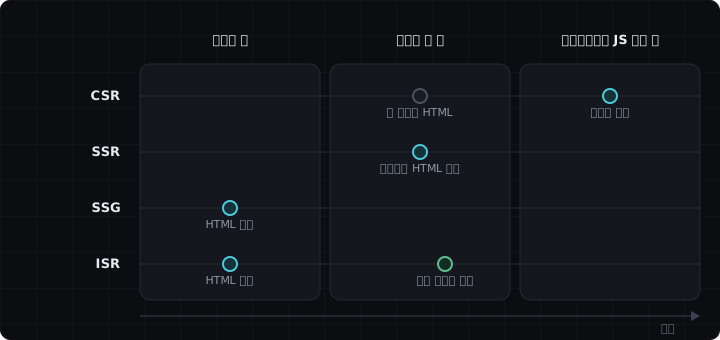
The further left, the more is made ahead of time, so the response is faster. The further right, the closer to the time of the request, so the data is more current.
What is Hydration
Say the server built this HTML and sent it.
<button>장바구니에 담기</button>The add-to-cart button is drawn on the screen. But nothing happens when you click it. The HTML only has the shape, with no behavior such as onClick or useState attached.
When the browser downloads the JavaScript and runs React, React finds the HTML that is already there and matches it up with its own components. This process is Hydration.
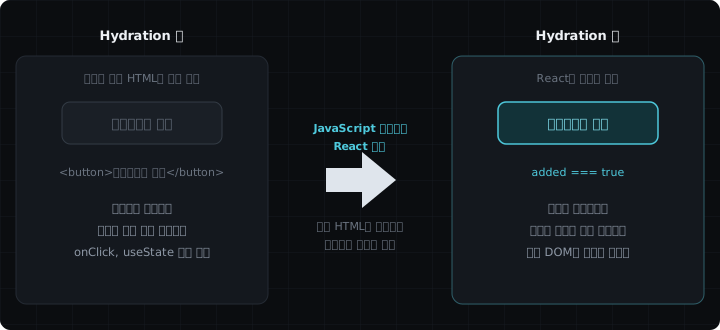
The component that gets connected looks like this.
'use client';
import { useState } from 'react';
export default function AddToCartButton() {
const [added, setAdded] = useState(false);
return (
<button onClick={() => setAdded(!added)}>
{added ? '장바구니에 담김' : '장바구니에 담기'}
</button>
);
}React doesn't create the DOM anew. It uses the <button> the server sent as is and only connects the event handlers and state. That's why the screen doesn't flicker.
Hydration is different from CSR
An app that starts with an empty <div id="root"> has no Hydration. A React app made with Vite is one of these. React creates the DOM from scratch, so there is no HTML to take over at all.
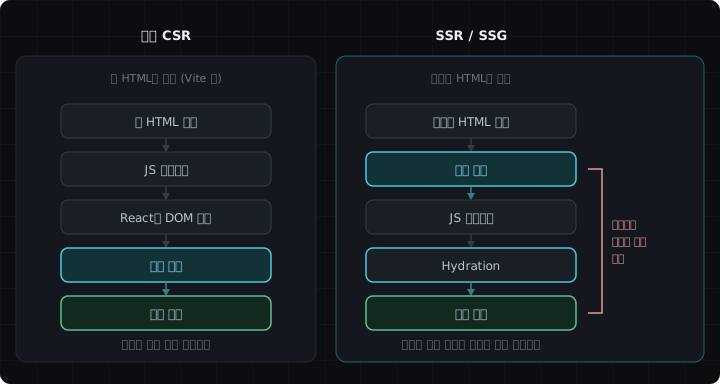
The path on the right has a stretch where the screen is visible first and only then starts responding to clicks. The path on the left has no such stretch, but the screen itself appears later.
That said, in the Next.js App Router this distinction doesn't apply as is. Even a component marked 'use client' gets its first markup from the server. The browser only fills in the data that goes inside it, so Hydration still happens. The case with no Hydration at all is a pure CSR app, where the server sends only an empty shell.
CSR (Client-Side Rendering)
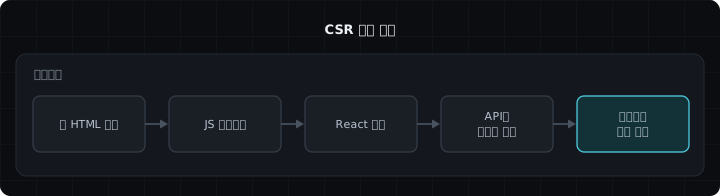
JavaScript runs in the browser first, and then it fetches the data and fills in the screen.
'use client';
import { useEffect, useState } from 'react';
export default function CartPage() {
const [items, setItems] = useState<CartItem[]>([]);
// Runs in the browser, so the cart is empty in the first HTML
useEffect(() => {
fetch('/api/cart')
.then((res) => res.json())
.then(setItems);
}, []);
return (
<ul>
{items.map((item) => (
<li key={item.id}>{item.name}</li>
))}
</ul>
);
}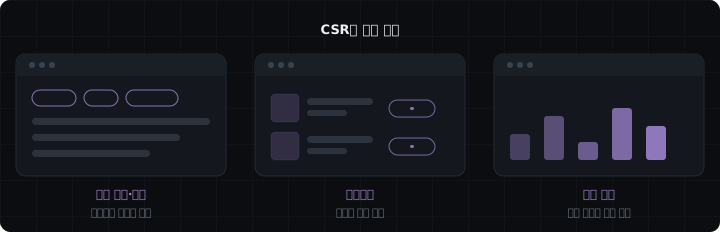
The first HTML has no data, and the browser fetches it itself. That makes it a good fit for screens with a lot of interaction. On the other hand, the data request starts only after the JS has been downloaded, so the initial load is the slowest.
SSR (Server-Side Rendering)
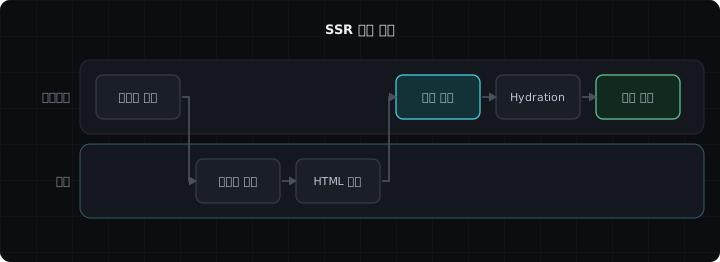
On every request, the server fetches the data, completes the HTML, and sends it.
export default async function OrderListPage() {
// no-store fetches fresh data on every request. With force-cache instead, it keeps using the cached response
const response = await fetch('https://example.com/api/orders', {
cache: 'no-store',
});
const orders: Order[] = await response.json();
return (
<ul>
{orders.map((order) => (
<li key={order.id}>{order.title}</li>
))}
</ul>
);
}
The latest data at the time of the request goes into the HTML. It can show different content to each user, and the content is visible without JS, which helps with search visibility. But the server works on every request, so the first response is slower than with SSG.
SSG (Static Site Generation)
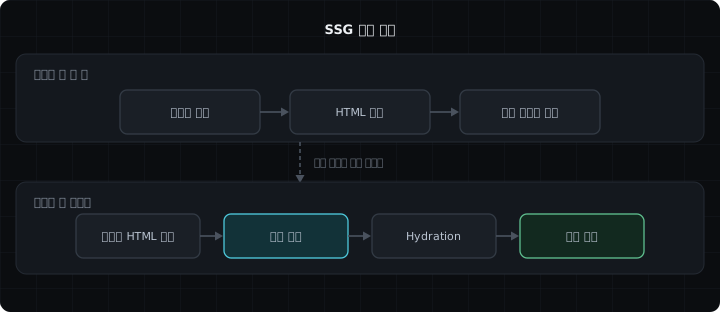
The HTML is completed at build time, and the same file is returned for every request.
export default async function EventListPage() {
// force-cache keeps using the response fetched at build time. With no-store instead, it fetches fresh data on every request
const response = await fetch('https://example.com/api/events', {
cache: 'force-cache',
});
const events: Event[] = await response.json();
return (
<ul>
{events.map((event) => (
<li key={event.id}>{event.title}</li>
))}
</ul>
);
}Note: The reason to spell out cache: 'force-cache' is the version. From Next 13 through 14, fetch responses were cached by default, but 15 flipped that default. In 16 you also have to turn caching on yourself, so if you leave it out, the response isn't kept in the cache.

The HTML is fixed at build time, so the server doesn't render on each request. It's easy to put on a CDN, so the response is the fastest. But changing the content requires a new build, and personalization isn't possible.
ISR (Incremental Static Regeneration)
It serves static pages built with SSG, and after a set time it builds them again and swaps them in.
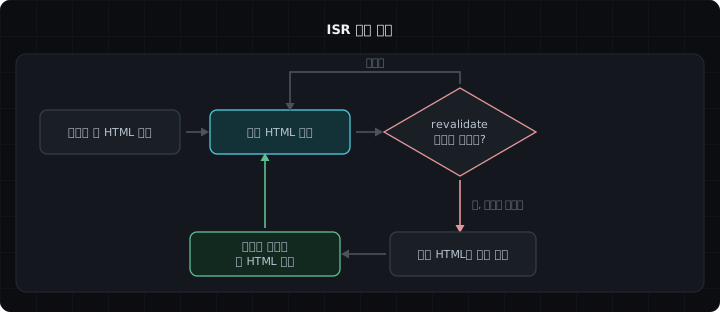
revalidate: 60 doesn't mean it rebuilds on its own every 60 seconds. When a request comes in after 60 seconds have passed, the old HTML is served first and the server builds a new one in the background. The new HTML goes out starting with the next request.
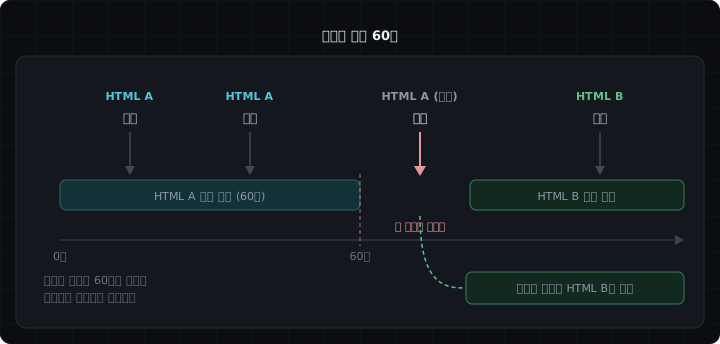
If nobody visits, no regeneration happens either.
export default async function ProductListPage() {
// The first request after 60 seconds triggers regeneration. false caches indefinitely, 0 doesn't cache
const response = await fetch('https://example.com/api/products', {
next: { revalidate: 60 },
});
const products: Product[] = await response.json();
return (
<ul>
{products.map((product) => (
<li key={product.id}>{product.name}</li>
))}
</ul>
);
}
The response is as fast as SSG, and pages are updated one by one without rebuilding everything. Data up to one interval old can show up. So it fits screens that don't need to be real time and only need to be current periodically.
You can also decide with route settings instead of fetch
The four examples above split the methods with fetch options. When there's no fetch, for example when reading a DB directly, you decide by exporting a route setting at the top of the file.
| Method | Route setting |
|---|---|
| SSR | export const dynamic = 'force-dynamic' |
| SSG | Nothing to write. Static is the default |
| ISR | export const revalidate = 60 |
SSR is written like this.
// Re-render on the server for every request
export const dynamic = 'force-dynamic';
export default async function OrderListPage() {
const orders = await db.orders.getAll();
return (
<ul>
{orders.map((order) => (
<li key={order.id}>{order.title}</li>
))}
</ul>
);
}For ISR, you only export a number.
// Regenerate on the first request after 60 seconds
export const revalidate = 60;
export default async function ProductListPage() {
const products = await db.products.getAll();
return (
<ul>
{products.map((product) => (
<li key={product.id}>{product.name}</li>
))}
</ul>
);
}For SSG there's nothing to write. If you leave the settings empty, it runs once at build time and stays static. If you want to keep it from becoming dynamic by mistake, you can set export const dynamic = 'error' so the build fails when the page can't be made static.
Caution:The revalidate value has to be a number that can be read at build time. revalidate = 600 works, but revalidate = 60 * 10 doesn't. dynamic and revalidate go away when you turn on Cache Components, covered below. In that case you use cacheLife instead.
Cache Components, what changed in Next.js 16
The two approaches above set the method with fetch options and route settings. 16 has a third approach. You turn on cacheComponents.
// next.config.ts
import type { NextConfig } from 'next';
const nextConfig: NextConfig = {
cacheComponents: true,
};
export default nextConfig;Inside the function or component you want to cache, you write 'use cache' and set its lifetime with cacheLife.
import { cacheLife } from 'next/cache';
export default async function ProductListPage() {
'use cache';
cacheLife('hours'); // Reuse this result on the scale of hours
const products = await getProducts();
return (
<ul>
{products.map((product) => (
<li key={product.id}>{product.name}</li>
))}
</ul>
);
}Instead of fetch options or export const revalidate, you put a mark on the thing being cached itself.
So why did it change this way? In the previous model, the unit of the decision was the route. If you read cookies() once anywhere on a page, the whole page switches to request-time rendering. For example, the product list could be cached, but one recommendations area forces the whole page to be drawn again.
Cache Components moved that unit down to functions and components. The official docs describe it like this.
Data fetching is dynamic by default, and you choose what to cache at the page, component, or function level.
So one page can have a static shell, cached areas, and areas drawn on every request, all together. If you wrap only the parts that change per request in <Suspense>, the rest goes out first as a shell made ahead of time. This is Partial Prerendering, and it becomes the default behavior when you turn on cacheComponents.
The way caching is turned on was also flipped. Before, the framework decided on its own by looking at the fetch options and whether request-time APIs were used. That's why it was hard to trace back why a page had become dynamic. Now the default is dynamic, and you mark what to cache yourself.
Where it can be used also widened. The previous cache options were attached to fetch, so code that read a DB directly needed a separate API called unstable_cache. 'use cache' can go on any async function.
Caution:The two models can't be used together. Turning on cacheComponents removes dynamic, dynamicParams, revalidate, and fetchCache, and leaving them in causes an error. In 16 it's off by default. It's fine to understand the two approaches above first and come back to this later.
The four methods at a glance
| Method | When HTML is generated | Where HTML is generated | Data fetching | Hydration |
|---|---|---|---|---|
| CSR | After the browser runs the JS | Browser | Browser | None (for pure CSR) |
| SSR | On request | Server | On request | Yes |
| SSG | At build time | Build server | At build time | Yes |
| ISR | At build time + on regeneration | Server | On regeneration | Yes |
When you use a Client Component in the Next.js App Router, the first markup comes from the server, so Hydration happens.
Here is how the four methods can be split within one service.
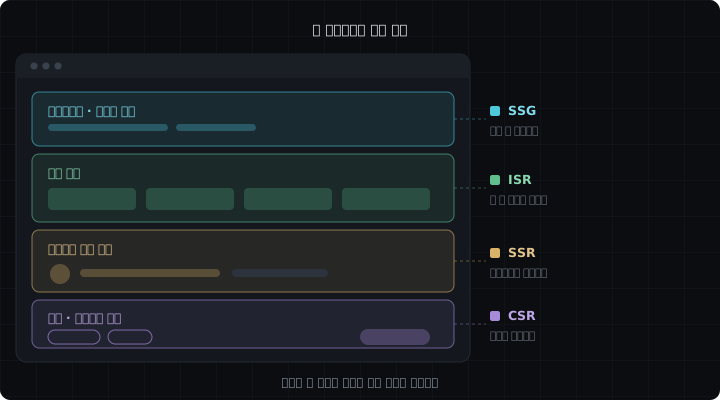
The brand introduction is SSG, the product list is ISR, the personalized recommendations are SSR, and the filters and the add-to-cart button are CSR.
References
- #Cache Components
- #CSR
- #Hydration
- #ISR
- #Next.js
- #SSG
- #SSR
- #Rendering
- #Server-Side Rendering
- #Frontend